


Short answer: yes. Apple Pay, Google Pay and Samsung Pay all work through a normal phone case. The NFC signal passes through plastic, silicone, fabric and leather without trouble. The only real blockers are metal cases and very thick multi-layer cases. A Keebos is slim and non-metal, so tap-to-pay works normally, and because it is worn on a strap your phone is already in your hand at the terminal. $49.90 with a 6 card wallet.

Why It Works: NFC Does Not Care About Plastic
Tap-to-pay uses NFC, a very short range radio signal between your phone and the terminal. Radio passes straight through non-conductive materials, which is why a case makes no difference to it. Plastic, silicone, TPU, fabric and leather are all effectively invisible to it.
This is also why you have never had to take a case off at a card machine, and why nobody sells a special "Apple Pay case". Almost every case already works.
The Two Things That Actually Block It
1. Metal
Metal is conductive, so it interferes with the signal. Full metal cases, metal plates for magnetic car mounts, and metal bumper cases with a solid back are the usual culprits. If tap-to-pay stopped working after you changed cases, check whether the new one has a metal plate in it.
2. Real thickness
NFC range is a couple of centimetres at best. A heavy multi-layer rugged case can push the phone far enough from the reader that it fails or takes several tries. A slim case will not.
A Keebos is a slim fitted case with no metal plate, so neither applies.

The One Thing People Get Caught By: Card Clash
This is worth knowing if you keep cards in a wallet case, ours included.
If you keep a contactless bank card in the wallet on the back of your phone, the terminal can sometimes see both the card and the phone at once. Depending on the reader it either picks the wrong one, charges the card instead of the phone, or throws an error and asks you to try again. That is not the case blocking anything, it is two payment methods in the same place.
Three ways to avoid it, in order of how easy they are:
- Present the top of the phone to the reader rather than laying the whole back flat on it. The NFC antenna sits toward the top of the phone, further from the wallet.
- Keep the contactless card out of the wallet and carry a chip-and-PIN card, an ID, a transit card or cash there instead.
- Take the phone off the terminal between attempts. Hovering while it errors and retries is what usually produces the double charge scare.
None of this is unique to us. It happens with every wallet case and every card-holder sleeve, and most people never hear about it until it happens at a till.
Google Pay and Samsung Pay
Same technology, same answer. Google Pay and Samsung Pay both use NFC and both work through a normal case. The same two blockers apply, metal and real thickness, and the same card clash issue exists if you keep a contactless card behind the phone.
Keebos fitted cases are made for iPhone, Samsung Galaxy including the Z Fold and Z Flip, and Google Pixel, so whichever wallet you use, tap-to-pay behaves the same way.
Transit Gates Are the Real Test
A shop terminal will wait for you. A ticket gate will not, and there is a queue behind you.
This is where wearing the phone genuinely helps: it is already on your chest, so you lift it to the reader and keep walking rather than digging through a pocket while people pile up. Hold the top of the phone to the pad, not the flat of the back where your cards are, and it reads first time.

Why a Keebos Makes Contactless Easier, Not Harder
The reason this post exists is that a case with a wallet sounds like it should get in the way, and in practice it does the opposite.
- The phone is already in your hand. Worn on a strap it is on your chest, so at a till or a gate you lift it and pay. No bag, no pocket, no putting your coffee down.
- Card and phone travel together. The sealable wallet holds up to 6 cards plus cash, so if a terminal is offline or a place is cash-only, your backup is attached to the same object.
- Nothing to unzip. Paying is one movement, which matters more than it sounds when you are holding a child, a dog lead or a suitcase.
- Slim and non-metal. Nothing in the case interferes with the signal in the first place.
For a lot of customers that is the moment they stop carrying a wallet at all: the phone pays, and the two cards they still need are on the back of it.
What It Costs
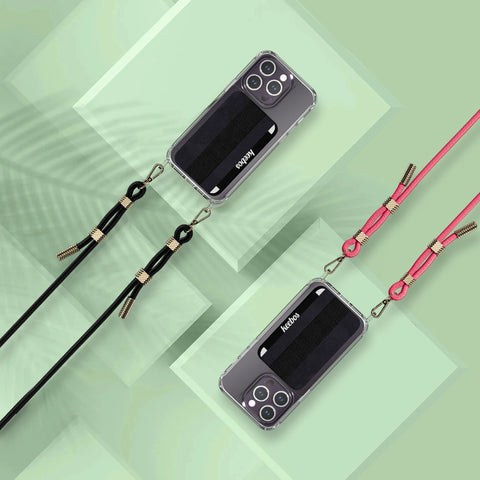
- Crossbody phone case with wallet and strap: $49.90. Includes the fitted case, the adjustable 54 inch strap, a sealable 6 card wallet and an elastic finger strap.
- Universal strap: $34.90. Attaches to a case you already own.
- Spare straps: from $24.90.
Free and fast US shipping and a 30 day money back guarantee from delivery, so if tap-to-pay does not behave the way you expect you can send it back.


Apple Pay and Phone Cases: FAQ
Does Apple Pay work through a phone case?
Yes. NFC, the signal tap-to-pay uses, passes straight through plastic, silicone, TPU, fabric and leather, so a normal case makes no difference. The exceptions are metal cases, cases with a metal plate for a magnetic car mount, and very thick multi-layer rugged cases that hold the phone too far from the reader.
Does contactless work through a phone case with cards in it?
Yes, but keeping a contactless bank card in a wallet case can cause card clash, where the terminal sees both the card and the phone and picks the wrong one or errors. Present the top of the phone to the reader rather than laying the back flat on it, or keep a chip-and-PIN card in the wallet instead of a contactless one.
Why did Apple Pay stop working after I changed cases?
Almost always metal. Check whether the new case has a metal plate for a car mount or a solid metal back. Very thick rugged cases can also weaken the signal enough to need several taps.
Do Google Pay and Samsung Pay work through a case?
Yes, they use the same NFC technology and behave identically. The same two blockers apply, metal and real thickness, and the same card clash issue applies if a contactless card is behind the phone.
Does a Keebos block Apple Pay?
No. It is a slim fitted case with no metal plate, so the signal passes through normally. Because it is worn on a strap, the phone is usually already in your hand at the terminal, which makes paying quicker rather than slower.
Can I use it at transit gates?
Yes, and it is where wearing the phone helps most, because gates do not wait. Lift the phone from your chest and hold the top of it to the pad rather than the flat of the back where your cards sit.
How many cards does the wallet hold?
Up to 6 cards plus cash in a sealable pocket on the back. Most people carry an ID, a backup card and a transit card there, which is what lets them stop carrying a wallet.
How much does it cost?
$49.90 for the case with the adjustable strap, the 6 card wallet and the finger strap included. Spare straps start at $24.90 and the universal strap is $34.90. US shipping is free.
Related Guides
- Hands-free phone cases
- Carrying a phone when your clothes have no pockets
- The best phone lanyard for travel
- What is a sling phone case?
- The phone case everyone has in Europe


